 KnightBike Hub
KnightBike Hub
KnightBike Hub
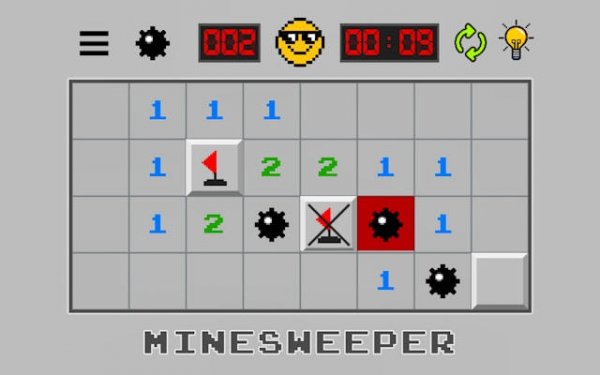
Classic Minesweeper Logic Puzzle delivers the timeless grid-based deduction experience with a polished interface. The multiple difficulty levels make it accessible for beginners and challenging for experts. The game runs smoothly in the browser with no downloads, providing a pure logic exercise that is both relaxing and mentally stimulating. Highly recommended for puzzle fans.
Classic Minesweeper Logic Puzzle is a free online version of the well-known grid-based deduction game. The game presents a rectangular board that conceals a number of hidden mines. Your objective is to uncover every safe square without accidentally revealing a mine. Each square you click reveals either an empty space or a number from 1 to 8. These numbers indicate how many mines are hidden in the eight surrounding cells. By using these clues, you can logically deduce where mines are located and mark them. This version stays true to the original design, offering a pure test of reasoning and patience. It is an excellent activity for mental exercise and relaxation. The game is played entirely in your browser with no downloads required. Its clean interface and straightforward rules make it accessible to players of all ages. Whether you are new to logic puzzles or a seasoned enthusiast, this game provides a rewarding challenge that sharpens your deductive thinking.
To begin, click any square on the board. A revealed square will show a number or be blank. Numbers from 1 to 8 tell you exactly how many mines are adjacent to that square. Use these numbers to figure out which neighboring squares are safe and which contain mines. You can right-click a square to place a flag, marking it as a suspected mine. Continue revealing safe squares and flagging mines. You win when all non-mine squares are uncovered and every mine is flagged. If you click on a mine, the game ends. The game includes multiple difficulty levels, so you can choose a board size that matches your experience. The controls are responsive and the visuals are clear, making it easy to focus on the logical deduction.
This game offers authentic classic gameplay with a clean, user-friendly interface. Multiple difficulty levels allow beginners and experts to find a suitable challenge. The game runs instantly in your browser without any downloads or installations. It provides a brain-training experience that improves logical deduction and pattern recognition. The design emphasizes clear visuals and responsive controls for a smooth playing experience. The game is free to play and stays true to the original puzzle concept.
Start by clicking in the center of the board to reveal a large area. Use the number clues to identify safe squares and mark mines. When you see a 1, it means only one mine is adjacent, so flag that square and clear the rest. Practice regularly to improve your pattern recognition and speed. Take your time—this is a game of logic, not speed.




Player Comments
Sign in to comment
You must be logged in before posting a review or rating.
No account? Create one
No comments yet. Be the first to comment!