 KnightBike Hub
KnightBike Hub
KnightBike Hub
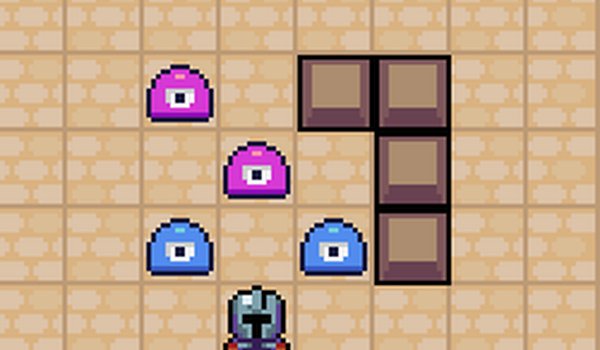
Penny Saver Knight Puzzle stands out with its focus on resource management within a puzzle framework. The pixel art style is charming without being distracting, and the tool variety keeps each level feeling distinct. The difficulty curve is well-paced, offering a satisfying challenge without becoming frustrating. The absence of time pressure allows for thoughtful play, making it a great choice for puzzle enthusiasts who enjoy strategic thinking. A solid, well-crafted game that respects the player's time.
Penny Saver Knight Puzzle presents a series of grid maps filled with obstacles. The player controls a knight who can use different items to clear a path. Each item has a unique cost and effect, so selecting the right one for each situation is essential. The game challenges players to complete each level with the smallest possible coin expenditure. This creates a puzzle where every action must be justified by its necessity. The math element comes into play as players calculate the cheapest combination of moves and tools to achieve victory.
The game adopts a pixel art aesthetic with a clean, minimalistic interface. This visual choice keeps the focus on the puzzle mechanics rather than distracting details. The color palette is simple but effective, making each obstacle and tool easy to identify. The top-down perspective provides a clear view of the entire level layout, which helps players plan their strategy. The overall presentation is calm and uncluttered, suitable for players of all ages.
Players have access to several tools, each with a distinct function and coin cost. Some tools may push obstacles in a certain direction, while others might remove them directly. The knockback effect adds a layer of tactical thinking, as players can use it to reposition obstacles for easier clearance. Choosing between a cheap but limited tool and a more expensive but versatile one is a recurring decision. This variety ensures that no two puzzles feel exactly the same, as the optimal tool choice changes with each layout.
As players advance, the puzzles become more intricate. Early levels introduce basic concepts and a single obstacle type. Later stages combine multiple obstacle varieties and require more complex sequences of actions. The difficulty ramps up gradually, giving players time to learn the mechanics before facing tougher challenges. Each new level presents a fresh layout, so memorization is less useful than adaptive thinking. This design keeps the gameplay engaging for both casual players and those seeking a mental workout.
The game supports both keyboard and mouse controls, making it easy to play on various devices. Keyboard commands allow quick selection of tools and movement, while mouse-only mode offers a simpler interface for touchscreens or casual play. Players can pause at any time to think about their next move. The option to retry a level without penalty encourages experimentation with different strategies. This flexibility makes the game approachable for younger players and those new to puzzle games.


Player Comments
Sign in to comment
You must be logged in before posting a review or rating.
No account? Create one
No comments yet. Be the first to comment!